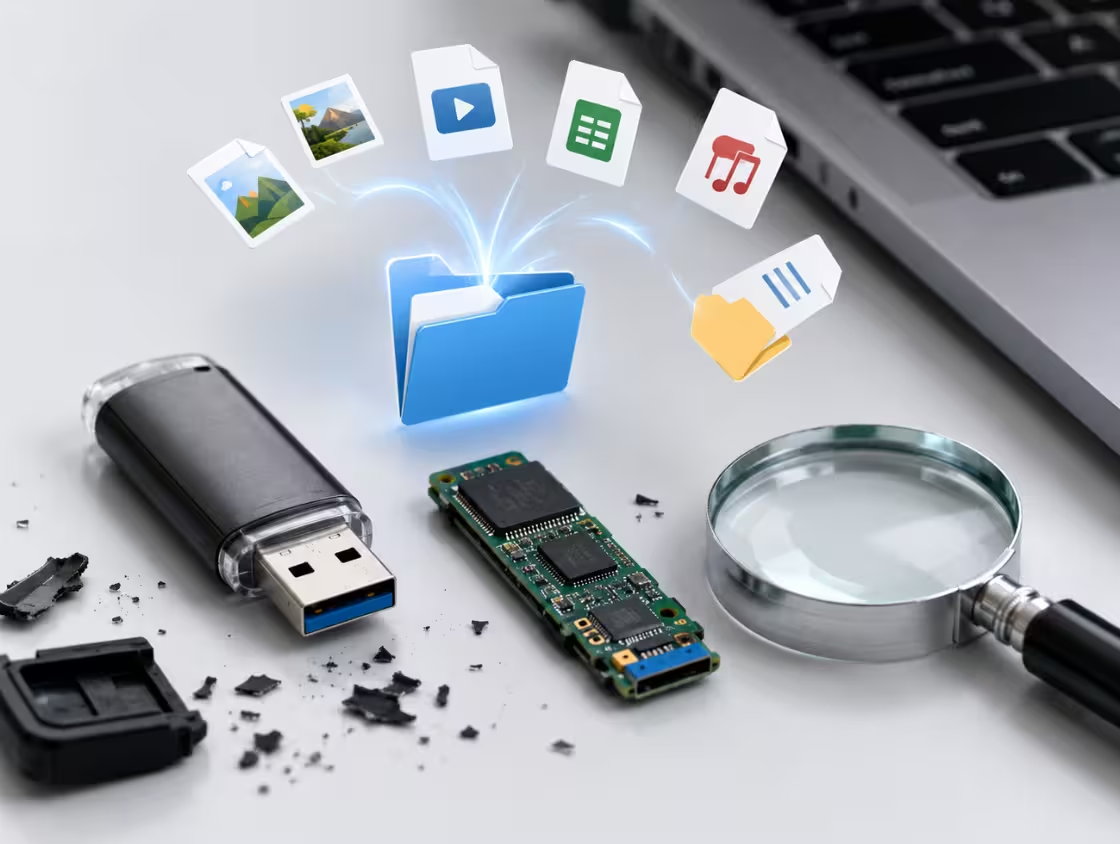

Professional USB Drive Recovery Services
PCPrompt offers expert USB drive recovery services to retrieve lost, deleted, or inaccessible data from damaged or corrupted USB flash drives. We handle issues such as physical damage, file system corruption, virus attacks, accidental formatting, and unrecognized USB devices using advanced recovery tools and techniques.
Our specialists carefully diagnose flash memory failures and restore important documents, photos, videos, and business files. Our secure USB drive recovery process ensures maximum data safety, fast turnaround time, and complete confidentiality for individuals and businesses.
USB Data Recovery for Business & Personal
USB data recovery for business and individual user needs, restoring files from controller faults, corrupted NAND, or broken connectors.
Controller Failure
USB controller failure stops detection and causes repeats, needing expert recovery from NAND memory’s
Flash Corruption
Corrupted NAND in USB drives causes wrong size, freezing, or format errors, needing expert data recovery.
Damaged PCB
Bent connectors or cracked USB PCBs cause power loss and require NAND chip work to recover data again
Frequently Asked Questions About USB Drive Recovery
A corrupted USB drive can be frustrating, especially when it contains important documents, photos, videos, or work-related files. Naturally, many users ask, can data be recovered from a corrupted USB drive? The good news is that, in many cases, the answer is yes. Depending on the cause and severity of the corruption, lost or inaccessible files can often be restored using recovery software or professional data recovery services.
Understanding how USB drive corruption occurs and the available recovery options can significantly improve your chances of retrieving valuable data.
What Causes USB Drive Corruption?
Before attempting recovery, it is important to understand why a USB drive becomes corrupted. Several factors can lead to USB drive corruption.
For example, improper ejection of the drive can damage the file system. Similarly, malware infections, interrupted file transfers, sudden power loss, and operating system errors can make stored data inaccessible.
Additionally, physical damage to the USB drive can result in corruption. Therefore, identifying the root cause helps determine the best recovery approach.
Signs of a Corrupted USB Drive
A corrupted USB drive often shows warning signs before complete failure. Common symptoms include:
- Files suddenly disappearing
- Error messages when opening the drive
- The drive requesting formatting
- Slow performance during file access
- Inability to copy or save files
- The USB drive not being recognized by the computer
If you notice these symptoms, it is important to stop using the drive immediately. Otherwise, further damage could reduce the chances of successful recovery.
How to Recover Data from a Corrupted USB Drive
Fortunately, several methods can help with corrupted USB drive recovery.
Use Data Recovery Software
In many cases, specialized USB recovery software can scan the corrupted drive and recover lost files. These tools search for recoverable data even when the file system is damaged.
Repair File System Errors
Sometimes, built-in operating system tools can repair minor corruption issues. For example, Windows users can use the CHKDSK utility to fix file system errors and restore access to stored files.
Create a Backup Image
Before performing recovery, creating a disk image of the USB drive is highly recommended. This helps prevent additional data loss during the recovery process.
Seek Professional Recovery Services
If the USB drive has severe corruption or physical damage, professional USB data recovery specialists may be required. These experts use advanced equipment and techniques to retrieve data that software cannot recover.
Tips to Improve Recovery Success
To maximize recovery chances:
- Stop using the USB drive immediately.
- Avoid formatting the drive unless necessary.
- Do not save new files to the affected device.
- Use reliable recovery software.
- Back up recovered files to a different storage location.
Furthermore, acting quickly often leads to better recovery results.
Conclusion
So, can data be recovered from a corrupted USB drive? In many situations, yes. Whether the corruption is caused by file system errors, malware, accidental removal, or software issues, recovery tools and professional services can often restore lost files. Therefore, if your USB drive becomes corrupted, avoid further use and begin the recovery process as soon as possible to improve your chances of successful USB data recovery.
If you’ve ever plugged in a USB drive and found that nothing happens, you’re not alone. Many users ask, why is my USB drive not detected when their computer fails to recognize the device. This issue can occur for several reasons, ranging from minor connection problems to serious hardware failures. Fortunately, understanding the possible causes can help you troubleshoot the problem and potentially recover your important files.
Common Reasons a USB Drive Is Not Detected
There are several factors that can cause a USB drive not detected error. Therefore, identifying the root cause is the first step toward finding a solution.
Faulty USB Port
One of the most common reasons a USB drive is not recognized is a damaged or malfunctioning USB port. For example, dust, debris, or physical wear can interfere with the connection. As a result, the computer may fail to detect the drive.
To rule out this possibility, try connecting the USB drive to a different USB port or another computer.
Corrupted USB Drive
Sometimes, the USB drive itself becomes corrupted due to improper ejection, interrupted file transfers, or malware infections. Consequently, the operating system may not be able to read the drive correctly.
In such cases, recovery software may help restore access to your files.
Outdated or Missing Drivers
USB devices rely on system drivers to communicate with the operating system. If these drivers are outdated, damaged, or missing, the USB device may not appear when connected.
Therefore, updating or reinstalling USB drivers can often resolve detection issues.
Drive Letter Conflicts
Another common cause is a drive letter conflict. Occasionally, Windows assigns a drive letter already in use by another device. As a result, the USB drive may not appear in File Explorer even though it is connected.
Fortunately, changing the drive letter through Disk Management can often solve the problem.
Hardware Damage
Physical damage can also explain why your USB drive is not detected. For instance, bent connectors, water exposure, overheating, or accidental drops may damage internal components.
Furthermore, flash memory chips can wear out over time, especially after years of heavy use. In these situations, professional USB data recovery services may be required.
How to Fix a USB Drive That Is Not Showing Up
If your USB drive is not detected, try the following steps:
- Test the drive on another computer.
- Use a different USB port.
- Update USB and chipset drivers.
- Check Disk Management for unassigned drives.
- Run error-checking utilities.
- Scan for malware.
- Use reliable recovery software if files are inaccessible.
Additionally, avoid formatting the drive until you have attempted data recovery, as formatting can make file recovery more difficult.
Preventing Future USB Drive Problems
To reduce the risk of USB detection issues:
- Always use the “Safely Remove Hardware” option.
- Keep antivirus software updated.
- Avoid unplugging the drive during file transfers.
- Store USB drives in a safe, dry location.
- Back up important files regularly.
As a result, you can extend the lifespan of your USB storage devices and minimize the risk of data loss.
Conclusion
So, why is my USB drive not detected? The problem can stem from faulty ports, corrupted file systems, outdated drivers, drive letter conflicts, or physical hardware damage. However, by following proper troubleshooting steps and acting quickly, you can often restore access to your USB drive and recover valuable data. Moreover, adopting good storage practices can help prevent future USB detection issues and ensure reliable performance over time.
Losing important files after formatting a pen drive can be stressful. As a result, many users ask, can formatted pen drive data be recovered? The good news is that, in many cases, the answer is yes. Whether the formatting happened accidentally or intentionally, data recovery is often possible if the files have not been overwritten. However, the success of recovery depends on several factors, including the type of formatting and how the drive has been used afterward.
Understanding how data recovery works can help you maximize the chances of restoring your valuable files.
What Happens When a Pen Drive Is Formatted?
When a pen drive is formatted, the operating system typically removes the file system information that points to stored files. However, the actual data may remain on the storage device until new data replaces it.
For example, a quick format usually deletes file references while leaving the data intact. Therefore, recovery software may still locate and restore lost files. On the other hand, a full format may overwrite portions of the data, making recovery more difficult.
Consequently, acting quickly after formatting is essential.
Can Formatted Pen Drive Data Be Recovered Successfully?
The success of formatted pen drive recovery depends on several factors.
Type of Format
A quick format generally offers a higher recovery success rate because the original data often remains untouched. In contrast, a full format may significantly reduce the chances of recovery.
New Data Written to the Drive
After formatting, saving new files to the pen drive can overwrite existing data. As a result, previously stored files may become permanently unrecoverable.
Therefore, it is important to stop using the drive immediately once you realize data has been lost.
Drive Condition
Physical damage or severe corruption can complicate the recovery process. Nevertheless, professional recovery specialists may still be able to retrieve files in some cases.
Methods to Recover Data from a Formatted Pen Drive
Fortunately, there are several ways to perform pen drive data recovery.
Use Data Recovery Software
Specialized recovery tools can scan the formatted pen drive and identify recoverable files. These applications search for file signatures and hidden data that may still exist on the drive.
Restore from Backup
If you regularly back up your files, recovery becomes much easier. Simply restore the missing data from your backup storage.
Seek Professional Recovery Services
When software recovery fails or the pen drive is physically damaged, professional USB data recovery services may offer the best solution. These experts use advanced tools to recover data from complex situations.
Tips to Improve Recovery Chances
To increase the likelihood of successful recovery:
- Stop using the pen drive immediately.
- Avoid copying new files to the drive.
- Use trusted recovery software.
- Save recovered files to a different storage device.
- Create regular backups to prevent future data loss.
Additionally, acting quickly can significantly improve recovery results.
Conclusion
So, can formatted pen drive data be recovered? In many situations, yes. If the data has not been overwritten and the drive remains functional, recovery software or professional services can often restore lost files. Furthermore, avoiding further use of the pen drive and beginning the recovery process promptly can greatly improve your chances of successful formatted pen drive recovery. By following the right steps, you may be able to recover important documents, photos, videos, and other valuable data.
A broken USB connector is one of the most common reasons a flash drive becomes inaccessible. When the connector is bent, loose, or completely detached, users often worry that their important files are lost forever. Fortunately, in many cases, broken USB connector repair is possible, allowing access to the stored data. However, the success of the repair depends on the extent of the damage and the condition of the internal components.
What Causes USB Connector Damage?
USB flash drives are designed for portability, but frequent use can place stress on the connector. For example, repeatedly plugging and unplugging the drive may weaken the connection points over time. Additionally, accidental drops, excessive force, and improper handling can cause the connector to bend or break.
As a result, the computer may fail to recognize the device, making it impossible to access files. Nevertheless, a damaged connector does not always mean the data itself has been lost.
Can a Broken USB Connector Be Repaired?
In many situations, a technician can successfully repair a USB connector and restore access to the drive. If the connector is detached but the memory chip and circuit board remain intact, the connector can often be resoldered to the board. Consequently, the flash drive may function normally again.
However, if the damage extends beyond the connector and affects internal components, the repair process becomes more complicated. In such cases, standard repairs may not be enough to recover the data.
Professional USB Data Recovery Methods
When connector repair alone cannot restore access, professional USB data recovery services may use advanced techniques. For instance, specialists can remove the memory chip from the damaged drive and read the data directly using specialized equipment.
This process, often called chip-off recovery, is typically used when the USB drive has suffered severe physical damage. Although it requires technical expertise, it can successfully recover files from many otherwise unusable devices.
Risks of DIY Repairs
Many users attempt to fix a damaged USB drive themselves. While online tutorials may seem helpful, DIY repairs often carry significant risks. For example, excessive heat from soldering tools can damage delicate components. Furthermore, improper handling may permanently destroy recoverable data.
Therefore, if the files are valuable or irreplaceable, seeking professional assistance is usually the safest option.
How to Improve Recovery Success
To maximize the chances of recovery, stop using the USB drive immediately after noticing damage. Additionally, avoid forcing the connector into a USB port, as this may worsen the problem. Instead, store the drive safely and consult a qualified recovery specialist.
Losing important files from a USB flash drive can be stressful. Whether the data loss occurs due to accidental deletion, corruption, malware, or physical damage, many users immediately ask: How long does USB data recovery take? The answer depends on several factors, including the cause of data loss, the drive’s condition, and the recovery method used.
Average USB Data Recovery Time
In most cases, USB data recovery can take anywhere from a few minutes to several hours. If the files were recently deleted and the drive is functioning normally, recovery software may restore the data within 30 minutes to 2 hours. However, more complex situations often require additional time.
For example, if the USB drive contains a large amount of data or has severe file system corruption, the recovery process may take several hours. In extreme cases involving hardware damage, professional recovery services may need several days to complete the task.
Factors That Affect Recovery Time
Size of the USB Drive
The storage capacity of the drive plays a significant role in flash drive recovery time. Larger drives contain more data, which means scanning and analyzing files will naturally take longer.
Type of Data Loss
Different recovery scenarios require different amounts of time. For instance, recovering accidentally deleted files is usually faster than restoring data from a corrupted or formatted USB drive. Therefore, the complexity of the issue directly impacts recovery duration.
Physical Condition of the Drive
A healthy USB drive can often be scanned quickly. However, if the device has physical damage, such as a broken connector or failed memory chip, the USB recovery process becomes more complicated. As a result, specialized tools and expert intervention may be required.
Recovery Software and Hardware
Modern recovery tools can significantly reduce recovery times. Nevertheless, older systems or low-quality software may slow down the process. Consequently, using reliable recovery solutions can improve both speed and success rates.
Professional USB Data Recovery
When software cannot recover data from USB devices, professional recovery services become necessary. Although these services may take between one and seven days, they often achieve higher success rates, especially for physically damaged drives.
Tips to Speed Up Recovery
To improve recovery outcomes, stop using the USB drive immediately after data loss. Additionally, avoid saving new files to the device, as this can overwrite recoverable data. Furthermore, choose reputable recovery software or consult a professional when needed.
USB flash drives are widely used for storing and transferring data because they are portable, affordable, and convenient. However, like all storage devices, they can eventually fail. Understanding the main causes of USB flash drive failure can help users protect valuable files and extend the lifespan of their devices.
Physical Damage
One of the most common USB drive failure causes is physical damage. Since flash drives are frequently carried in pockets, bags, and laptops, they are exposed to accidental drops, bending, and impacts. As a result, the internal components or USB connector may become damaged, making the device unreadable.
Excessive Write and Erase Cycles
USB flash drives use flash memory, which has a limited number of write and erase cycles. Over time, frequent data transfers gradually wear out the memory cells. Consequently, the drive may develop errors, slow performance, or complete failure. Although modern drives are designed for durability, their flash memory lifespan is not unlimited.
Improper Removal
Many users unplug their USB drives without safely ejecting them. However, doing so can interrupt ongoing read or write operations. Therefore, files may become corrupted, and the file system can suffer damage. Repeated improper removal significantly increases the risk of flash drive data loss.
Virus and Malware Attacks
Malware infections can also lead to USB flash drive failure. For example, viruses may corrupt files, alter system structures, or make data inaccessible. In severe cases, malicious software can damage important storage sectors, reducing the drive’s reliability.
Electrical Issues
Power surges, unstable USB ports, and electrical fluctuations can harm a USB storage device. Furthermore, excessive voltage may damage the controller chip inside the flash drive. Once the controller fails, accessing stored data becomes extremely difficult.
Manufacturing Defects and Aging
Sometimes, a damaged USB drive results from manufacturing defects. Additionally, natural aging affects electronic components over time. Even if a drive is rarely used, prolonged exposure to heat, moisture, and dust can contribute to deterioration.
How to Prevent USB Flash Drive Failure
To reduce the risk of failure, always eject the drive safely, avoid physical damage, use antivirus software, and keep backups of important data. Moreover, storing the drive in a cool, dry place can improve its longevity.
Conclusion
In summary, USB flash drive failure can occur due to physical damage, excessive usage, improper removal, malware infections, electrical problems, and aging components. By following proper handling and maintenance practices, users can minimize risks and ensure their USB drives remain functional for years.