
How to find a Matching Donor Drives?
Hard disk donor drive guidelines are designed to help you maximize compatibility when searching for a donor head stack assembly. While a perfect match cannot be guaranteed, following these steps will increase your chances of success.
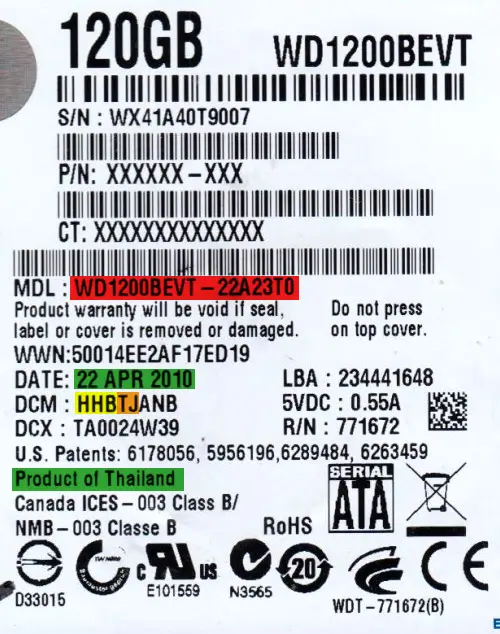
Begin by identifying the make of the hard drive and matching the specifications provided. Note that this guide does not cover quantum drives or older Western digital models (pre-Caviar). For reference, we’ve highlighted where to find the relevant details on the label in the sample images provided. Keep in mind that your label may vary based on the product line or manufacturing date.
Each specification is prioritized and color-coded to indicate its importance. While finding a donor that matches all the criteria might not be possible, the color-coding will help you focus on the most critical details. more details, contact us
RED: Essential. You almost certainly cannot use a donor without this matching.
ORANGE: high priority. This information is often required to match for a donor to be compatible.
YELLOW: Medium priority. This information can help increase the chances of compatibility if a match is available.
GREEN: Low priority. This is normally not a factor but can be used to choose between multiple donors matching everything else.
Toshiba
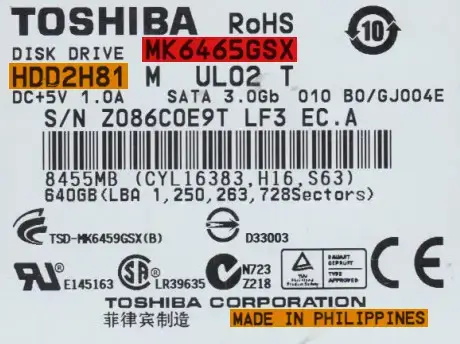
Use the following criteria to find a donor drive.
Model number: Match the whole number. If you cannot do this, you may be able to match the first eight digits of the model number and the family code instead.
Country of manufacture: Should be the same.
Hard drive code: The first part of the HDD code should match.
Hitachi
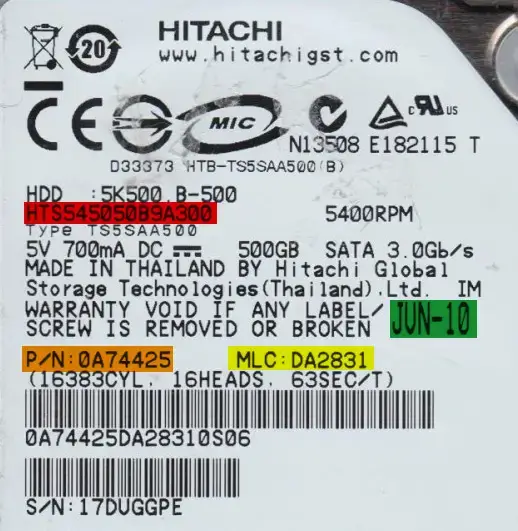
Use the following criteria to find a donor drive.
Model number: Match the model number exactly.
Part number: Match the part number exactly.
Heads map: Match the physical heads (PH) map exactly. It is OK if the donor has more heads than the original drive, but all heads before that should match.
MLC: Match the MLC exactly.
Date of manufacture: Should be within three months — the closer the better.
Older
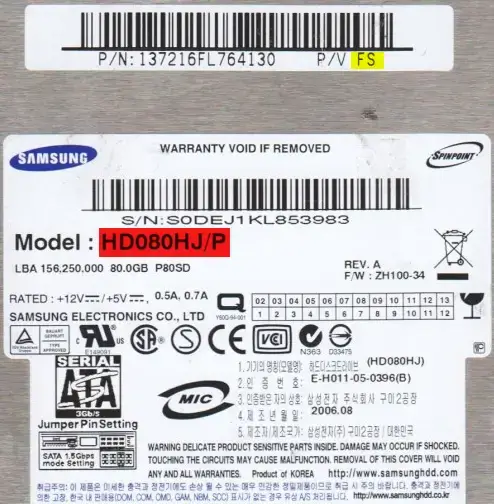
These drives can be identified by having a separate barcode sticker with two sets of numbers on it.
Use the following criteria to find a donor drive.
Model number: Match the model number exactly.
Heads map: Match the physical heads (PH) map exactly. It is OK if the donor has more heads than the original drive, but all heads before that should match.
Country of manufacture: Should be the same.
P/V: To the right of the part number. Some drives may be missing this field.
PCB revision: PCB Rev should be the same.
Newer
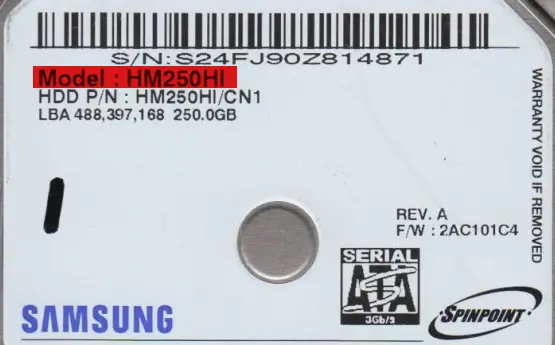
These are 2.5″ inch drives, series M7S2, M7E (i.e. Mercury / Rev .07 / S3M), MP4, MT2, M8E, and M9T, as well as 3.5″ inch drives, series F3 or later. The series can be found printed on the PCB or in some instances on the drive label.
Use the following criteria to find a donor drive.
Model number: Match the model number exactly.
Heads map: Match the physical heads (PH) map exactly. It is OK if the donor has more heads than the original drive, but all heads before that should match.
Preamplifier revision: The preamplifier revision should be the same.
Barracuda
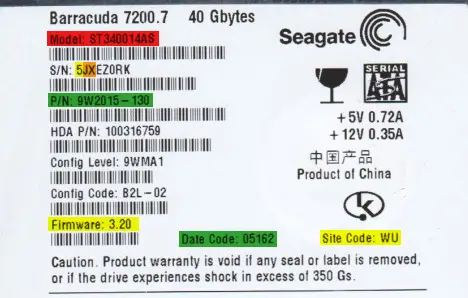
These drives can be identified by containing a period (.) in the firmware number.
Use the following criteria to find a donor drive.
Model number: Match the model number exactly.
Heads map: Match the physical heads (PH) map exactly. It is OK if the donor has more heads than the original drive, but all heads before that should match.
Serial number: Match the second and third characters of the serial number.
Firmware (7-series or earlier): Optional — For drives that are 7-series or earlier, match the firmware number.
Serial number: In addition to the 2nd and 3rd digit, match the first character of the serial number.
Site code: Match the site code. This indicates the location of manufacture.
Part number: Match the 1st half of the part number. If the second half also matches, it is likely to be an even better match.
Date code: Convert the date codes. They should be within three months of each other — the closer the better.
F3
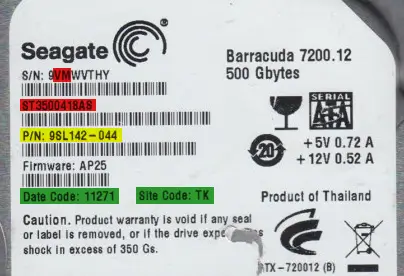
These drives can be identified by NOT containing a period ( . ) in the firmware number.
Use the following criteria to find a donor drive.
Model number: Match the model number exactly.
Serial number: Match the second and third characters of the serial number.
Heads map: Match the physical heads (PH) map exactly. It is OK if the donor has more heads than the original drive, but all heads before that should match.
Preamplifier type: Optional — Match the first two digits of the preamplifier type.
Part number: Match the 1st half of the part number. If the second half also matches, it is likely to be an even better match.
Site code: Match the site code. This indicates the location of manufacture.
Date code: Convert the date codes. They should be within three months of each other — the closer the better.
Caviar 1st Edition
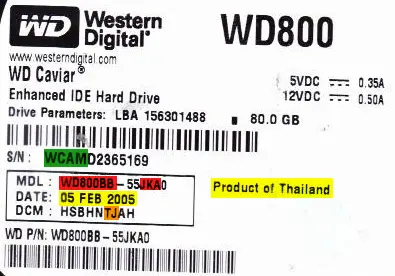
These are generally drives that are 10 or more years old. They can be differentiated by having a PCB that is, more or less, square compared to the L-shaped PCBs of later models.
Use the following criteria to find a donor drive.
Model number: Match the entire first part of the model number as well as three characters in the second part. Eg: WD800BB-55JKA0
Heads map: Match the physical heads (PH) map exactly. It is OK if the donor has more heads than the original drive, but all heads before that should match.
DCM: Locate the J or 2 in the DCM. It should be towards the end. Make sure that the J or 2 as well as the preceding character matches on the donor.
Country of manufacture: Should be the same.
Date of manufacture: Should be within three months — the closer the better.
Serial number: Match the first four digits of the serial numbers.
PCB Revision: The PCB Rev should be the same.
Marvell (version 1)
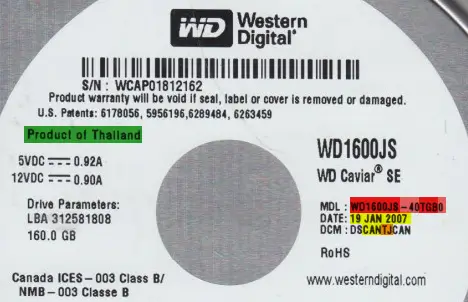
These drives can be identified by the family code in the model number (the 3rd and 4th digits after the hyphen). The following families are part of this type: Mammoth (family codes EY, EZ, FA, FC, FJ, FM, HE, HF, JE, JS, JT, JY), Sabre (JH, JJ, JK, JL, JM, JN, JP, JR, JU, KS, LN, MG), Hawk (MH, MJ, MK, ML, MV, MW, MY, MZ, NC, ND, NE, NF, NG, NH, NJ, NK, NT, NV, NY, PA), Hawk-2 (SG, SH, TG), Starling (RD, RE, RF, RJ, RK, RL), Buccaneer (KE, KF, KG, KM), Zeus (MN, MP, VJ), and Raider (PC, PD, PE, PF, PG). Even if these families of drives say “Caviar SE” on the label, they belong to the Marvell architecture.
Use the following criteria to find a donor drive.
Model number: It is ideal to match the whole model number, but if none is available you can try one that matches the entire first part of the model number as well as these three characters in the second part: WD1600JB-40TGB0
Heads map: Match the physical heads (PH) map exactly. It is OK if the donor has more heads than the original drive, but all heads before that should match.
DCM: Locate the J or 2 in the DCM. It should be towards the end. Make sure that the J or 2 as well as the preceding character matches on the donor. If the three characters before that match as well, it will have an even better chance of being a match.
Date of manufacture: Should be within three months — the closer the better.
Preamplifier: Exact match for both vendor and revision.
Microjogs: Each value should be within 300 of the original drive — the closer the better.
Country of manufacture: Should be the same.
Marvell (version 2)
These encompass most newer and modern Western Digital drives.
Use the following criteria to find a donor drive.
Model number: It is ideal to match the whole model number, but if none is available you can try one that matches the entire first part of the model number as well as these three characters in the second part: WD1200BEVT-22A23T0
Heads map: Match the physical heads (PH) map exactly. It is OK if the donor has more heads than the original drive, but all heads before that should match.
DCM: Locate the J or 2 in the DCM. It should be towards the end. Make sure that the J or 2 as well as the preceding character matches on the donor.
Preamplifier: Exact match for both vendor and revision.
Microjogs: Each value should be within 200 of the original drive — the closer the better.
Country of manufacture: Should be the same.
Date of manufacture: Should be within three months — the closer the better.

If you lose important files from a hard drive, SSD, USB drive, memory card, or RAID server, the first step is to stop using the device immediately. Continued use can overwrite deleted or damaged data, making recovery more difficult. Avoid installing recovery software, copying files, or attempting repeated restarts if the device is making unusual noises or showing errors. Physical damage or clicking sounds may indicate internal hardware failure that requires professional attention.
At PCPrompt Data Recovery in Kochi, recovery specialists use advanced diagnostic tools and secure recovery methods to retrieve lost data safely from damaged storage devices. Whether the issue is accidental deletion, formatting, corruption, virus attacks, or hardware failure, early professional evaluation increases the chances of successful data recovery. Proper handling is essential to protect sensitive files, business documents, photos, videos, and critical information from permanent loss.
Yes, data can often be recovered from failed hard drives depending on the severity of the damage. Hard disk failures may occur due to bad sectors, firmware corruption, accidental formatting, power surges, overheating, water damage, or physical head crashes. Common warning signs include clicking sounds, slow access, missing files, or the drive not being detected by the computer. Attempting DIY repairs can sometimes worsen the damage permanently.
Professional hard drive data recovery services use specialized recovery equipment and controlled recovery procedures to safely extract data from damaged drives. At PCPrompt Data Recovery in Kerala, technicians handle desktop and laptop hard disks from brands like WD, Seagate, Toshiba, and Samsung. Advanced recovery methods help retrieve documents, photos, videos, databases, and business files from logically or physically damaged hard drives while maintaining strict data confidentiality and security throughout the recovery process.
The time required for professional data recovery depends on the type of storage device, severity of damage, and amount of data involved. Logical issues such as accidental deletion or formatting may sometimes be resolved within a few hours, while physically damaged hard drives, SSD failures, RAID rebuilds, or water-damaged devices can require several days for secure recovery. Complex cases involving firmware repair or internal component failure may take additional time.
At PCPrompt Data Recovery in Kochi, every storage device undergoes a detailed evaluation before the recovery process begins. Technicians provide transparent updates and use advanced recovery technology to maximize success rates while protecting data confidentiality. Recovery timelines vary based on device condition, storage capacity, and file complexity. Whether recovering family photos, office files, CCTV footage, or business databases, professional handling helps ensure safe and reliable data recovery with minimal risk of permanent data loss.
PCPrompt Data Recovery is trusted by customers across Kerala for secure, professional, and transparent data recovery solutions. The company provides specialized recovery services for hard drives, SSDs, RAID servers, laptops, USB drives, memory cards, and CCTV storage systems. Customers from Kochi, Thrissur, Kozhikode, Thiruvananthapuram, Malappuram, Kannur, and other districts rely on advanced recovery technology and experienced technicians to retrieve important files safely.
Professional recovery procedures focus on protecting sensitive data confidentiality while maximizing recovery success rates. Whether dealing with accidental deletion, physical hard disk damage, corrupted SSDs, RAID crashes, or inaccessible storage devices, PCPrompt follows secure diagnostic and recovery practices. Transparent communication, secure handling, and a customer-focused approach help businesses, professionals, students, and home users recover valuable personal and business data throughout Kerala efficiently and safely.
Free data recovery software may sometimes help recover simple deleted files, but using such tools on damaged or failing drives can be extremely risky. Many recovery applications continuously scan unstable drives, which can worsen bad sectors, overload failing components, and permanently corrupt recoverable data. SSDs, RAID servers, and physically damaged hard drives are especially vulnerable to additional failure during repeated DIY recovery attempts.
Professional data recovery services use controlled recovery procedures designed to protect the storage device during the recovery process. At PCPrompt Data Recovery in Kochi, specialists create secure sector-level clones and perform advanced diagnostics before attempting file extraction. This approach minimizes stress on damaged devices and improves recovery success rates. Businesses and individuals dealing with important office files, legal documents, CCTV recordings, or irreplaceable personal data should avoid experimental recovery methods that could permanently destroy valuable information.
Yes, RAID server data recovery is possible even after multiple drives fail, although the recovery process can be technically complex. RAID systems are commonly used by businesses, CCTV systems, offices, and servers to improve performance and data redundancy. However, RAID failures can happen due to controller corruption, accidental rebuilds, multiple disk failures, power surges, firmware damage, or human configuration errors. Improper RAID rebuilding attempts may permanently destroy critical business data.
At PCPrompt Data Recovery in Kochi, RAID recovery specialists analyze RAID parameters, parity structures, controller information, and failed disks using enterprise-grade recovery equipment. Advanced recovery techniques are used to recover databases, server files, virtual machines, accounting systems, and surveillance recordings from RAID 0, RAID 1, RAID 5, RAID 6, and NAS storage systems. Secure recovery procedures and detailed diagnostics help businesses recover valuable operational data while minimizing downtime and protecting confidential information.