
How to find a Matching Donor Drives?
Hard disk donor drive guidelines are designed to help you maximize compatibility when searching for a donor head stack assembly. While a perfect match cannot be guaranteed, following these steps will increase your chances of success.
Begin by identifying the make of the hard drive and matching the specifications provided. Note that this guide does not cover quantum drives or older Western digital models (pre-Caviar). For reference, we’ve highlighted where to find the relevant details on the label in the sample images provided. Keep in mind that your label may vary based on the product line or manufacturing date.
Each specification is prioritized and color-coded to indicate its importance. While finding a donor that matches all the criteria might not be possible, the color-coding will help you focus on the most critical details. more details, contact us
RED: Essential. You almost certainly cannot use a donor without this matching.
ORANGE: high priority. This information is often required to match for a donor to be compatible.
YELLOW: Medium priority. This information can help increase the chances of compatibility if a match is available.
GREEN: Low priority. This is normally not a factor but can be used to choose between multiple donors matching everything else.
Toshiba
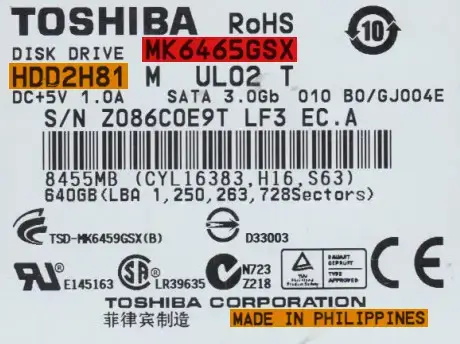
Use the following criteria to find a donor drive.
Model number: Match the whole number. If you cannot do this, you may be able to match the first eight digits of the model number and the family code instead.
Country of manufacture: Should be the same.
Hard drive code: The first part of the HDD code should match.
Hitachi
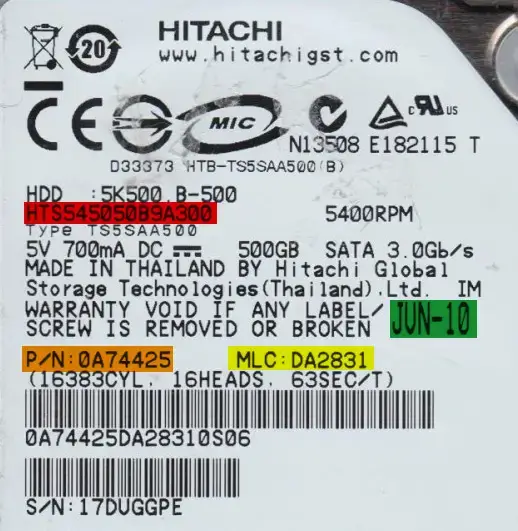
Use the following criteria to find a donor drive.
Model number: Match the model number exactly.
Part number: Match the part number exactly.
Heads map: Match the physical heads (PH) map exactly. It is OK if the donor has more heads than the original drive, but all heads before that should match.
MLC: Match the MLC exactly.
Date of manufacture: Should be within three months — the closer the better.
Older
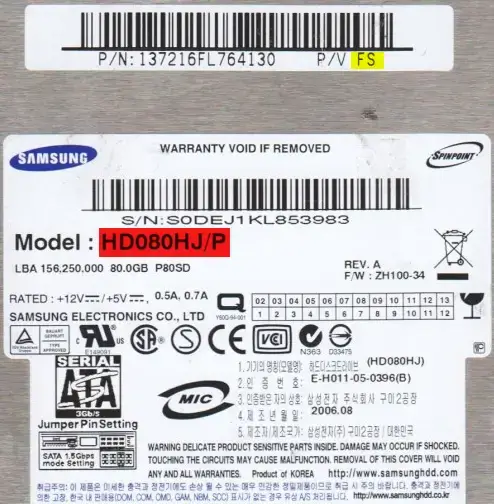
These drives can be identified by having a separate barcode sticker with two sets of numbers on it.
Use the following criteria to find a donor drive.
Model number: Match the model number exactly.
Heads map: Match the physical heads (PH) map exactly. It is OK if the donor has more heads than the original drive, but all heads before that should match.
Country of manufacture: Should be the same.
P/V: To the right of the part number. Some drives may be missing this field.
PCB revision: PCB Rev should be the same.
Newer
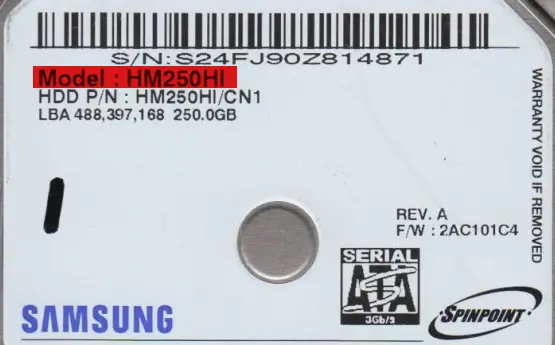
These are 2.5″ inch drives, series M7S2, M7E (i.e. Mercury / Rev .07 / S3M), MP4, MT2, M8E, and M9T, as well as 3.5″ inch drives, series F3 or later. The series can be found printed on the PCB or in some instances on the drive label.
Use the following criteria to find a donor drive.
Model number: Match the model number exactly.
Heads map: Match the physical heads (PH) map exactly. It is OK if the donor has more heads than the original drive, but all heads before that should match.
Preamplifier revision: The preamplifier revision should be the same.
Barracuda
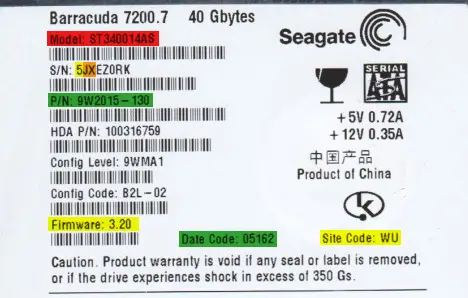
These drives can be identified by containing a period (.) in the firmware number.
Use the following criteria to find a donor drive.
Model number: Match the model number exactly.
Heads map: Match the physical heads (PH) map exactly. It is OK if the donor has more heads than the original drive, but all heads before that should match.
Serial number: Match the second and third characters of the serial number.
Firmware (7-series or earlier): Optional — For drives that are 7-series or earlier, match the firmware number.
Serial number: In addition to the 2nd and 3rd digit, match the first character of the serial number.
Site code: Match the site code. This indicates the location of manufacture.
Part number: Match the 1st half of the part number. If the second half also matches, it is likely to be an even better match.
Date code: Convert the date codes. They should be within three months of each other — the closer the better.
F3
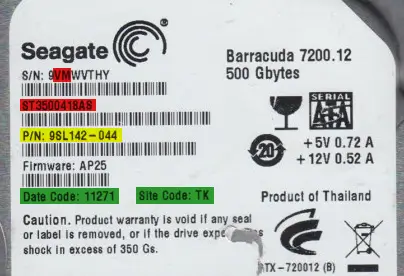
These drives can be identified by NOT containing a period ( . ) in the firmware number.
Use the following criteria to find a donor drive.
Model number: Match the model number exactly.
Serial number: Match the second and third characters of the serial number.
Heads map: Match the physical heads (PH) map exactly. It is OK if the donor has more heads than the original drive, but all heads before that should match.
Preamplifier type: Optional — Match the first two digits of the preamplifier type.
Part number: Match the 1st half of the part number. If the second half also matches, it is likely to be an even better match.
Site code: Match the site code. This indicates the location of manufacture.
Date code: Convert the date codes. They should be within three months of each other — the closer the better.
Caviar 1st Edition
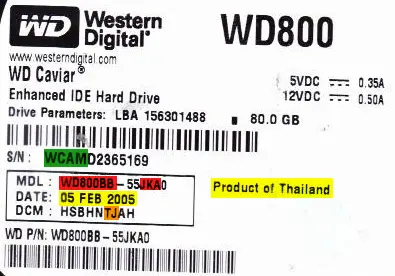
These are generally drives that are 10 or more years old. They can be differentiated by having a PCB that is, more or less, square compared to the L-shaped PCBs of later models.
Use the following criteria to find a donor drive.
Model number: Match the entire first part of the model number as well as three characters in the second part. Eg: WD800BB-55JKA0
Heads map: Match the physical heads (PH) map exactly. It is OK if the donor has more heads than the original drive, but all heads before that should match.
DCM: Locate the J or 2 in the DCM. It should be towards the end. Make sure that the J or 2 as well as the preceding character matches on the donor.
Country of manufacture: Should be the same.
Date of manufacture: Should be within three months — the closer the better.
Serial number: Match the first four digits of the serial numbers.
PCB Revision: The PCB Rev should be the same.
Marvell (version 1)
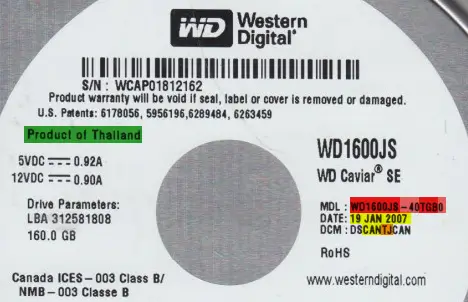
These drives can be identified by the family code in the model number (the 3rd and 4th digits after the hyphen). The following families are part of this type: Mammoth (family codes EY, EZ, FA, FC, FJ, FM, HE, HF, JE, JS, JT, JY), Sabre (JH, JJ, JK, JL, JM, JN, JP, JR, JU, KS, LN, MG), Hawk (MH, MJ, MK, ML, MV, MW, MY, MZ, NC, ND, NE, NF, NG, NH, NJ, NK, NT, NV, NY, PA), Hawk-2 (SG, SH, TG), Starling (RD, RE, RF, RJ, RK, RL), Buccaneer (KE, KF, KG, KM), Zeus (MN, MP, VJ), and Raider (PC, PD, PE, PF, PG). Even if these families of drives say “Caviar SE” on the label, they belong to the Marvell architecture.
Use the following criteria to find a donor drive.
Model number: It is ideal to match the whole model number, but if none is available you can try one that matches the entire first part of the model number as well as these three characters in the second part: WD1600JB-40TGB0
Heads map: Match the physical heads (PH) map exactly. It is OK if the donor has more heads than the original drive, but all heads before that should match.
DCM: Locate the J or 2 in the DCM. It should be towards the end. Make sure that the J or 2 as well as the preceding character matches on the donor. If the three characters before that match as well, it will have an even better chance of being a match.
Date of manufacture: Should be within three months — the closer the better.
Preamplifier: Exact match for both vendor and revision.
Microjogs: Each value should be within 300 of the original drive — the closer the better.
Country of manufacture: Should be the same.
Marvell (version 2)
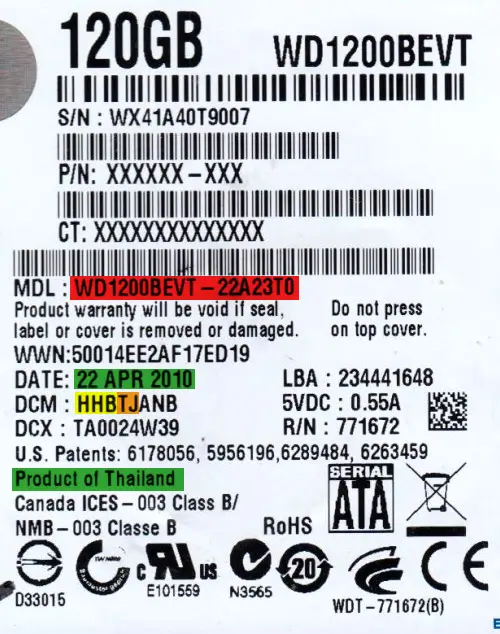
These encompass most newer and modern Western Digital drives.
Use the following criteria to find a donor drive.
Model number: It is ideal to match the whole model number, but if none is available you can try one that matches the entire first part of the model number as well as these three characters in the second part: WD1200BEVT-22A23T0
Heads map: Match the physical heads (PH) map exactly. It is OK if the donor has more heads than the original drive, but all heads before that should match.
DCM: Locate the J or 2 in the DCM. It should be towards the end. Make sure that the J or 2 as well as the preceding character matches on the donor.
Preamplifier: Exact match for both vendor and revision.
Microjogs: Each value should be within 200 of the original drive — the closer the better.
Country of manufacture: Should be the same.
Date of manufacture: Should be within three months — the closer the better.

We provide professional data recovery for hard drives, SSDs, RAID servers, laptops, desktops, memory cards, USB drives, and external storage devices. Our technicians handle both logical and physical failures using advanced recovery tools.
Yes, data can often be recovered from crashed or dead hard drives. Specialized equipment and techniques are used to repair internal damage, access the disk safely, and retrieve important files.
Yes, we follow a transparent “no data, no charge” policy. Customers only pay after successful recovery, ensuring trust and confidence in the recovery process.
Yes, deleted or formatted data can often be recovered if it has not been overwritten. Data recovery specialists use advanced scanning tools to locate lost file structures and restore them from the storage device.
Professional data recovery is safe when performed by experienced technicians. Reputable companies use read-only methods and specialized tools to avoid further damage, ensuring your original data remains intact during the recovery process.
Data recovery time depends on the type of problem, storage device, and amount of data. Simple logical recoveries may take a few hours, while complex cases like RAID or physically damaged drives can take several days.
TradeIndia – B2B exposure, trusted directory